
Butterbean: a Cat Desktop Pet, From Sketch to Nine Loops
Meet Butterbean, a cream cat desktop pet with nine sticker-style loops. See the animation fixes, preview its poses, and check what the $5 pack includes.
CodePets ·

A small cat for the corner of your workspace
Butterbean is a cream-colored cat desktop pet made for the CodePets catalog. It has short paws, pink cheeks, a mint bow, and nine small animation loops: blinking, keyboard paws, napping, stretching, waving, washing its face, cheering, tilting its head, and hugging a heart. The downloadable animation pack is listed at $5. You can inspect the animations on its product page before deciding whether the style suits your workspace.
The idea is easy to picture: an editor fills most of the screen, a terminal sits beside it, and a tiny cat occupies a quiet corner. That is the mood behind Butterbean. Its value is the character and its movement. The keyboard pose is an animation, not a connection to your keyboard, and the pack does not add an AI assistant or read your work.
Why the mint bow stayed
A desktop character needs to remain recognizable after it gets small. Butterbean uses a round body and a dark outline, with the face kept simple enough to read at a glance. The peach inside the ears and the pink cheeks add warmth without filling the character with details that disappear when it is scaled down.
The mint bow gives the cream silhouette a recognizable accent. It also became a useful checkpoint during animation review: if the bow changed size or seemed to move to another side, the frames no longer felt like the same cat. A pleasing single image was only the starting point. Every pose needed to keep that identity.
The first draft looked better standing still
The early version had the right general look, but playback exposed problems that a still preview hid. The cat drifted between frames. The sleeping poses changed too much. The typing action did not make the paw movement clear enough. These were drawing and sequence problems; changing the playback speed could not fix them.
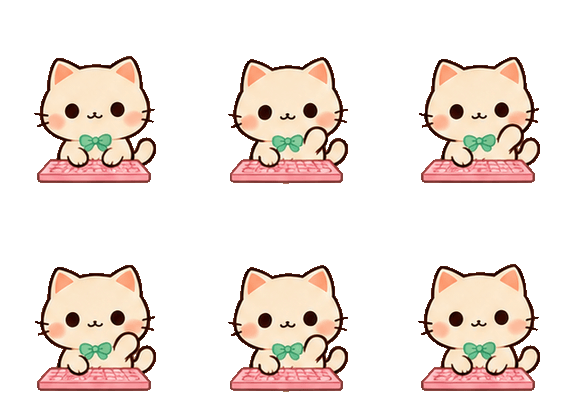
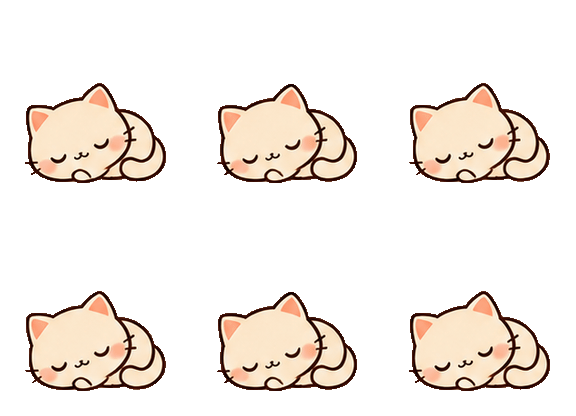
For the revision, the actions were rebuilt around four sequential key poses each. The nap became a curled, closed-eye pose. The keyboard row gained a more visible paw lift. The feet were aligned to a shared baseline so that the whole character would not slide around simply because one drawing sat higher than the next. This was a more useful repair than adding extra movement everywhere.
Nine gestures, with room for quiet ones
Gentle blink and cozy nap are the quietest poses. Paw stretch and hello wave open up the silhouette so the gesture is easy to recognize. Face wash keeps the movement near the face; curious tilt changes the attitude with a small head movement. Keyboard paws gives the cat a tiny work routine. Happy cheer raises its paws, and heart hug brings in a simple prop.
The cheer is deliberately named a cheer, rather than a jump: the feet stay grounded. That distinction may sound small, but an action label should describe the animation you can actually see. The same applies to the keyboard pose. It shows the cat moving its paws at a keyboard; it does not promise to respond when you type.
If you are choosing a pet to keep beside a busy application, start by watching the quiet poses. Then try the more expressive ones. A pose that looks fun once may feel different after several repetitions. Your preference matters more than the number of actions in a list.

How the loop returns to the beginning
Each revised action uses four unique drawings. The eight-frame playback sequence runs forward through those drawings and then returns through them: 0, 1, 2, 3, 3, 2, 1, 0. This gives the gesture a short pause at each end and avoids flipping the cat horizontally just to create return frames.
There are therefore eight frame positions per action, but not eight independently drawn poses. The completed sheet contains nine rows and 72 cells. In the rendered checks, the first and last frames of every loop matched. That removes a mismatch at the loop boundary; it does not prove that every intermediate movement is perfectly smooth.
Butterbean has the rhythm of an animated sticker. Small differences in the hand-drawn-looking shapes remain, and four key poses will not move like a fully rigged 3D character. The previews show that tradeoff more honestly than a claim about a high frame rate would.
Three things to look at in the preview
First, watch the outline against both a light and a dark background. Pale fur can hide rough edges on white, while a darker surface makes those edges easier to inspect. Look between the paws and around the bow as well as around the outside of the body. The sprite sheet has an alpha channel, rather than a white rectangle painted behind the cat.
Second, watch the paws and the point where the body meets the ground. A character that shifts position between drawings can look as if it is sliding even when the intended action is only a blink. Third, let the same action repeat several times. Keep an eye on the return from the last frame to the first, the size of the head, and the position of the bow.
These checks are useful for other desktop pets too. A contact sheet helps you compare poses, but playback tells you how those poses behave together. You need both views to judge an animation.
What the $5 pack contains
The Butterbean catalog pack contains this ready-made character and its nine animation rows. The core pet files are pet.json and spritesheet.webp. The manifest describes the character; the image contains the frames. Buying this pack does not commission a new cat design, add new custom actions, or buy a standalone desktop application.
The current CodePets purchase flow uses your purchase email to recover the pack. It allows two downloads per purchased pack, so save a copy of the ZIP once you have it. Read the pricing and refund terms linked on the site before purchase, and check the installation guide against the app and operating system you actually use.
If the art appeals to you, the product preview is the next step. If your main requirement is a pet that reports agent status or responds to particular gestures, verify that behavior in the host application first. Those features are outside what this animation pack alone supplies.
What has been checked, and what still depends on your app
For this release, the source files, transparent sprite geometry, loop boundaries, and downloadable package contents were checked. The website production build passed, and the browser product page displayed the nine action choices and the existing purchase form. The keyboard animation selection was also checked in the browser.
Those checks are not a desktop compatibility test. Butterbean has not yet been verified in native desktop clients on Windows or macOS. Package validation confirms the files are present; it does not confirm how a particular app version will display them or choose animation states. A real payment and fulfillment run was not part of this character review either.
For installation help, record your operating system and app version, and check that the manifest and sprite sheet are in the expected folder. Send support that information and a description of the problem, without passwords or private recovery tokens. It makes a missing-file issue much easier to distinguish from a client behavior issue.
A note on how Butterbean was made
The artwork was generated with an AI image tool, then arranged into animation rows, aligned, and reviewed in playback. The original draft was kept alongside the repair notes. This article describes that specific process and the checks completed for this release; it is not a report of long-term daily use or customer results.
The useful lesson from making Butterbean was surprisingly small: watch the cat move before deciding the cat is finished. The bow, the paws, and the quiet return to the first pose did more to make it feel consistent than another elaborate action would have.
Open the Butterbean preview below and try the nap, keyboard paws, and wave. Which one would you actually want beside your editor? That is a better starting point than choosing from a still image alone.
Preview all nine Butterbean animations · Pricing and purchase details
Read the installation guide · Browse Codex pets · Recover a purchased pack
Keep reading
Speaki Strawberry Pajamas: Nine Cozy Desktop Pet Animations
Speaki Desktop Pet: 9 Animations and a Guide to the Meme
How to install Codex pets on Windows